 |
Mobile companion app - S10 Vault If you use S10 Password Vault on your PC, you can use the free S10 Vault mobile companion app on your phone or tablet for convenient access to your data when you're away from the PC. It lets you log in automatically to websites and fill forms with ease.
By installing S10 Vault you are accepting the End User License Agreement. |
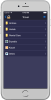 |


Setup - To use the app, you must first transfer your vault data from your PC onto your mobile device; either via online synchronization (by scanning a QR code displayed in the PC app) or via file transfer (via iTunes for iOS; for Android put the file somewhere under the phone's default storage folder, which is usually something like "/storage"). See in-app instructions for details.
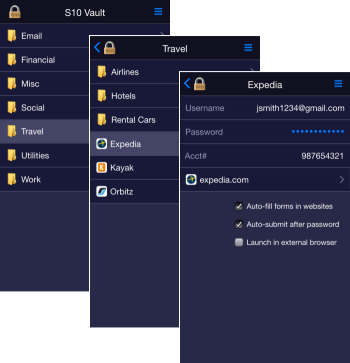 Login page - Open the vault with the same master password as in S10 Password Vault on your PC. To log out, use the menu icon at the top right.
Folder page - The app shows the content of one folder at a time (to minimize scrolling) and lets you drill into subfolders and accounts. To go back a level, tap the back-arrow icon at the top left corner or use the back button on Android devices.
Account page - Shows the username, password, and custom fields as well as links to launch any website(s) associated with the account. Password is by default masked - just tap the mask to reveal and tap again to hide.
Tapping the username-, password-, or a custom row will copy the value onto the clipboard so you can later use it in a website or in another app (by pressing and holding the targeted field, and then selecting Paste), although it is usually easier to just use the FILL feature described below.
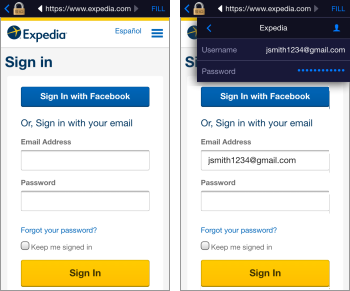 Website page - By default, websites will launch in a private browser built into the S10 Vault app, with a header offering a "FILL" tool that lets you easily fill forms in websites. For example, in a typical Login form, first tap the username textbox on the web page, tap the FILL tool, then tap the username item in the dropdown menu. Next, repeat this process for the password textbox. S10 Vault will remember these mappings so that next time you launch the site it can auto-fill and auto-submit the form to log you in automatically.
The FILL dropdown menu lets also lets you access your Personal Info, and even lets you switch to another account on the fly, which can be useful for example if you first log into a shopping website and then want to pay with a credit card which you have stored as another account.
Launch options
- To prevent forms you have prevously filled via the FILL tool from being auto-filled when you launch the website, uncheck the option "Auto-fill forms in websites".
- To avoid auto-submitting the form, which normally happens after a password is filled (either via the FILL tool or via the auto-fill mechanism), uncheck the option "Auto-submit after password".
- To launch a website in your normal browser instead of the built-in one, check the option "Launch in external browser". You won't have a FILL menu in this case, but you can copy/paste values as described in the "Account Page" section above.
Synchronization - For those who have enabled the Synchronization feature in S10 Password Vault on the PC, the mobile app offers a Synchronize feature in the main menu at the top right. This makes it very easy to get your latest information onto the mobile device after you have added or changed accounts in S10 Password Vault on your PC.
Timeout - For security reasons, if you go to another app and then return to S10 Vault after 10 minutes or more, the app will time out and display the login page.